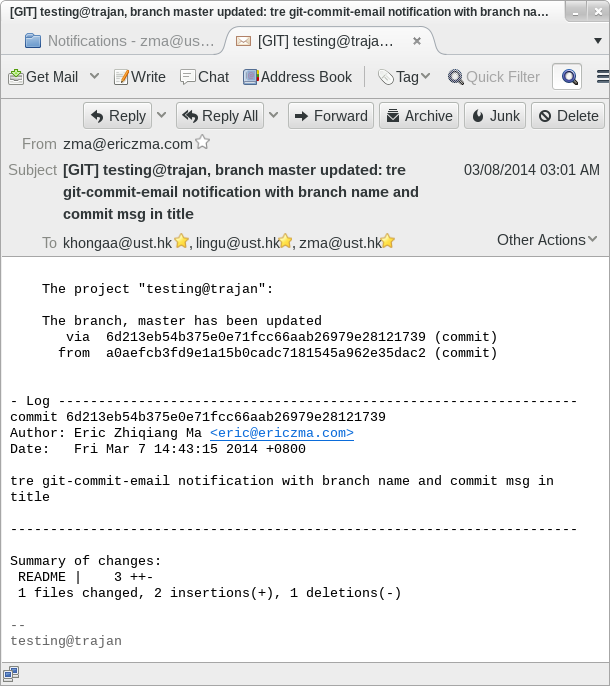
A method to send email notification to a list of email addresses by the remote git server after every push from the client will be introduced in this post. An example notification email after a commit is shown in the figure below. The subject contains a prefix, the repository name, the branch name and the last commit message. The body of the email contains a summary of the changes and the commit log.
How does it work
Table of Contents
After the client pushing to the git server, several actions are triggered. These actions are done by hooks. Hooks are scripts placed in the GIT_DIR/hooks directory. Here, GIT_DIR is the directory of the git repository on the git server. One of the trigger action is post-receive, so we can put a executable script with name post-receive under GIT_DIR/hooks. For every push by clients, post-receive will be executed to send email notification.
Now lets go to the detail of how to set up the email notification.
Install mailx
The script uses mailx to send emails out. You need to install mailx on your git server.
On Fedora 12+/RHEL6+/CentOS6+, the mailx package works just fine.
On Debian/Ubuntu/Linux Mint, please install the heirloom-mailx package instead of using the default bsd-mailx package. The mailx from bsd-mailx does not support all the options used such as -r in the script.
Get the post-receive script
My script that sends email like the example described above can be downloaded from: git post-receive script.
Or view the source code: git post-receive script
This script uses mailx to send email by default which uses the local message transfer agent service (like sendmail) to send email. You need to enable the message transfer agent to send out emails on your git server. You can also choose to use smtp to send out email, just find the line
# cat $email_tmp_file | mailx -S smtp="smtp://smtp.cse.ust.hk" -s "$emailsubject" -r $senderemail $recipients
near to the bottom of the script, uncomment it out, comment out the next line which calls mailx, and change the smtp server to yours. The script will use smtp server to send email. If you like to use Gmail’s smtp, please refer to
This script is changed from Andy Parkins’s one which is in git’s distribution. On fedora 12, the original script can be found under /usr/share/git-core/contrib/hooks.
Put the post-receive script into hooks directory
After getting the post-receive script, you need to copy it to or make a soft link (which I do since there usually many repositories) in the GIT_DIR/hooks/ directory on the git server.
Please note that this script should be executable. You may need to add executable mod bits to post-receive by
chmod a+x hooks/post-receive
when you are in GIT_DIR.
If you use soft links, setting the original post-receive file once is sufficient.
Change the repository description
The repository name in the email subject is the first line of $GIT_DIR/description. Change the first line of the description file to you project’s name.
Change the config file
The sender’s email address, the mail list and the subject prefix is defined in GIT_DIR/config file. I like to edit this config file by hand which is as easy as using git config command.
Add these line to the config file:
[hooks]
   mailinglist = "email1@example.com email2@example.com"
The email addressed in mailing list is separated by space.
The default subject prefix is [GIT]. You can change it to any string you like by adding hooks.emailprefix in the config file.
Now the email notification mechanism has been set up. You can change the script if more functions are needed. If you think your new version is great and would like to share it, send me a pull request.

Hi,
My post-receive-email scrip does not have the line to uncomment.
# cat $email_tmp_file | mailx -S smtp=”smtp://smtp.cse.ust.hk” -s “$emailsubject” -r $senderemail $recipients
I recently installed GIT on Ubuntu. Can you please update you tutorial for the lastest version of GIT?
Regards,
still looking for answer to my question above. Just to let you know that my GIT version 1.91.
Regards,
The tutorial here does NOT use the script from git release. Instead, this tutorial provides another post-receive script you can find in the post.
Hi Eric,
JFYI my mailx ( bsd-mailx, 8.1.2-0.20141216cvs-1) does not provide the “-r” option.
Thanks for providing that script.
regards
Ralf
Hi Ralf,
On Ubuntu/Debian/Linux Mint, please use `heirloom-mailx` mailx package.
I will update the post with the piece of information since it seems many Ubuntu users have the same problem as yours.
Previous comments:
Dhivya S
Hi
– What exactly will be the senderemail ? I want whoever committed,
to be ‘sender’ of the email
Eric Zhiqiang Ma
That will be a nice feature. But I got no time to implement it at
current. There are some cases that should be took care of. For
example:
1. The push contains multiple commits possibly by merging another
braunch from the others. Whoses email to use?
2. The committer may have no email set and a email address like
user@localhost will be provided. This may possibly lead the email
to be rejected by some email providers.
If you or someone else would lile to add the new feature, do send me a
pull request or a patch.
Eric Zhiqiang Ma
Updated script on Mar. 7, 2014: use `mailx` to send email by default which
uses the local message transfer agent service (like `sendmail`) to
send email. Just downloading the script and enable the message
transfer agent and it should work.
Sumer Joshi
Hi!
I am using Gitlab with the post-receive script. However, whenever I
try to commit code, I’m getting this error message:
remote:
*** hooks.mailinglist is not set so no email will be sent
remote:
*** for refs/heads/master update
632bdbcddeff12a6249ffdd2a6daca5e338c55f2->a8791e7d6abf81bf9c431958c52ee985a5e16111
To git@ssd-git.juniper.net:extracting-data-from-mysql-to-csv.git
632bdbc..a8791e7
master -> master
error: unable to create directory for
.git/refs/remotes/origin/master
error: Cannot lock the ref
‘refs/remotes/origin/master’.
I already set the hooks.mailinglist query in the config file of the
project. I was not sure how to go about fixing this issue.
Eric Zhiqiang Ma
I am not familiar wiht Gitlab. But please check whether Gitlab will
use the config file for configuration. It will be strange if it
does not.
Rafeta124
Hello,
finnaly someone get this work with that excelent code.
I’ve downloaded your script but I don’t know how to configure it.
I’m using Gitlab 6.4 and the Hooks path is on gitlab-shell/hooks.
Where do I can put the mailling address configs???
Have you tested it
with gitlab???
Sorry
for my poor english
Zhiqiang (Eric) Ma
Hi Rafeta, this script is for the vanilla git instead of gitlab. You
may need to integrated it into the gitlab systems if you need. For
vanilla git, it is under the .config. But this may be different for
the gitlab.
guest13498
Hi,
which version of mailx are you using? I installed bsd-mailx on my
Ubuntu but it doesn’t have the -S option to specify the smtp
server?
Zhiqiang Ma
Please find a discussion on the mailx client on Ubuntu
here:http://www.fclose.com/1473/setting-up-git-commit-email-notification/#comment-1076550845
Paul Theodoropoulos
Hi,
I’ve been tasked with implementing this on our local gitlab server
(v3.0.3). I’ve gone the the various configuration steps listed
above, and was just about to put the script into the git hooks dir –
but then I found that post-receive is currently a link
to
post-receive -> /home/git/.gitolite/hooks/common/post-receive. And that is a script
that part of the whole gitlab setup, containing the following:
{{{
#!/usr/bin/env bash
# This file was placed here by GitLab. It makes sure that your pushed commits
# will be processed properly.
while
read oldrev newrev ref
do
# For every branch or tag that was pushed, create a Resque job in redis.
pwd=`pwd`
reponame=`basename
“$pwd” | sed s/.git$//`
env -i redis-cli rpush
“resque:queue:post_receive”
“{“class”:”PostReceive”,”args”:[“$reponame”,”$oldrev”,”$newrev”,”$ref”,”$G
L_USER”]}”
> /dev/null 2>&1
done
}}}
So, I guess my question would be, can I just *append* this post-receive
script to the bottom of that existing post-receive script? Or am I
on the wrong track here….
Zhiqiang Ma
Hi Paul,
At the first glance, it should not work after simply appending the
script to the bottom of your existing one.
For example,
Both scripts have:
{{{
while
read oldrev…
}}}
after one script reads the input from the STDIN, the other script will
fail to get it.
But after some minor changes, it should work.
For the example above, you may just keep (or save) these variables and
change the 2nd script to use these variables instead of read them
from the STDIN.
Beside of this, you may change other minor aspects as also.
Paul Theodoropoulos
Thank you Zhiqiang-Ma, I appreciate the quick response!
Leo
Hello!
I am trying to configure smtp like that:
{{{
cat
$email_tmp_file | mailx -v -s “$emailsubject” -s
smtp-use-starttls -s ssl-verify=ignore -S smtp-auth=login -s
smtp=smtp://smtp.gmail.com:587 -s from=mail@domain -s
smtp-auth-user=mail@domain -s smtp-auth-password=QWERTY -s
ssl-verify=ignore -r $senderemail $recipients
}}}
But it doesn’t work at all. Where is my mistake?
Zhiqiang Ma
What output of the command do you get?
stuart
I’ve a remote bare repo at a windows client and when git tries to run the
script it says “mailx” command not found.
Help please!
Zhiqiang Ma
This means that ‘mailx’ is not installed on the system. If you are
using Fedora, try run ‘yum install mailx’ as root. On other
distros, please try to install the package the provides mailx.
liuzhong my
dear ma:
last week i installed
turnkey-gitlab-12.0-squeeze-x86.iso in my pc,this git system include
some useful tools ,such as gitlab ,webmin.and so on .and the git
server was well configured ,i could add and commit my code to the
server,now i want to automaly send emails to the users in my team ,i
read your article for long time ,but i can not do it ,please help
me, my mail:hds1989824@163.com thank you
Zhiqiang Ma
Hi liuzhong,
I am sorry that I am not familiar with turnkey-gitlab. But if you can
provide more details, I may help you to discuss / find possible
solutions. You are always welcome to ask questions in the forum
(http://www.fclose.com/b/forum/linux-related-forum2/ ).
liuzhong
OK ,the turnkeylinux-gitlab include gitolite gitlab ,i downloaded the
iso and burn it to a cd ,it is easy to install,avoid use command
mode install a lot of packages and soft if my pc’s os is ubantu
or fedroa. it simple to use.but I donot know $GIT_DIR/description
mean , i can not find it in my pc..
and can you tell me your
mail in order to send same pic to you ?
at last please fogive
my Chinglish. hehe
Zhiqiang Ma
I see. GIT_DIR is the directory of the git repository on the git
server. This is a unclear part of this tutorial. I have updated
it. GIT_DIR/description is the file named description in the git
repository directory.
I prefer to discuss the question related to the posts here or in
the forum. But if you want to contact me by email, please find it
here: http://www.fclose.com/b/contact/
hds1989824
i am sorry ,mybe i have a mistake .i haved install a turnkeylinux
on my pc somedays ago,and i found it was a debian system a few
minutes ago! so i might set the post-recive files in a wrong
place!not in the responsity/project/hooks/ ,your script ” on
debian the hook is stored in # /usr/share/doc/git-core/contrib/hooks/post-receive-email:” ,and i will try another time. i will be carefull!
Zhiqiang Ma
This script should be okay with most Linux distros including Debian.
The script here is actually a modified version of the script
from the git-core or similar package. You can download the
script here into the hooks/ or save it to somewhere and share
the script by many repositories by soft links.
smh
Is it possible to display the changes made
eg
+ some text
–
some text
I tried adding the following to the config under [hooks]
{{{
git show
-C %s; echo
}}}
but this hasn’t done anything
Zhiqiang Ma
You may consider modifying the generate_update_branch_email() function
in the script.
For example: modifying the ‘git diff-tree –stat –summary
–find-copies-harder $oldrev..$newrev’ line with the one you want.
Steven Dobbelaere
I installed the script but when I execute it in the terminal I get
this error: “GIT_DIR not set”
Any idea on how I can set my GIT_DIR variable
I suspect I have to do it here:
{{{
# — Config
# Set GIT_DIR either from the working directory, or from the environment
# variable.
GIT_DIR=$(git rev-parse
–git-dir 2>/dev/null)
if [ -z “$GIT_DIR” ];
then
echo >&2 “fatal: post-receive: GIT_DIR not
set”
exit 1
fi
}}}
Zhiqiang Ma
Hi Steven,
This script should be run by the git server automatically. Just save a
copy in hooks/post-receive in the git directory on the server side.
It will be invoked automatically by git when you push to the
repository.
Akzhan Feel
free to use colored diffs with https://github.com/bitboxer/git-commit-notifier
digitalpbk
Can somebody explain how to run this script from command line ?
Zhiqiang Ma
This script is designed to be automatically invoked by git rather than
for run from command line.
You may consider adapting it for command line use if you like. The
source code can be downloaded in the link in the post.
Sam change
sh to bash.
remove -r option
works fine then
Zhiqiang Ma
Hi Rainer,
You can find out the lines that have the msg_count and comment them out
to bypass these warnings (there are only several lines). It seems
the bash on your computer doesn’t support the ((msg_count+=1))
operation.
Nice to know that you find the script useful ;)
Rainer aaah,
thanks for the quick !
i managed to find the -S option and took it out. had to also remove -r
and now i’m happily sending mails, thanks!
:)
still have ugly output, though, something is wrong around the msg_count
variable:
Counting
objects: 5, done.
Delta compression using up to 2 threads.
Total
3 (delta 2), reused 0 (delta 0)
hooks/post-receive: 706:
msg_count+=1: not found
[: 706: ==: unexpected
operator
hooks/post-receive: 706: msg_count+=1: not found
[:
706: ==: unexpected operator
hooks/post-receive: 706:
msg_count+=1: not found
[: 706: ==: unexpected
operator
hooks/post-receive: 706: msg_count+=1: not found
[:
706: ==: unexpected operator
hooks/post-receive: 706:
msg_count+=1: not found
[: 706: ==: unexpected
operator
hooks/post-receive: 706: msg_count+=1: not found
[:
706: ==: unexpected operator
cat: /tmp/git-email-subject-10682:
No such file or directory
…
but things work! thanks!
Zhiqiang Ma
@Rainer It seems that you are using a distribution with old (not too old)
software. In RHEL/CentOS 5, the mailx version are very old and it
doesn’t support -S option. You can try to put these parameters
into the ~/.mailrc file.
Rainer
Hi, cool script thanks!
Doesn’t work for me though, failing with the following issue:
git stuff
……
hooks/post-receive: 706: msg_count+=1: not
found
[: 706: ==: unexpected operator
hooks/post-receive: 706:
msg_count+=1: not found
[: 706: ==: unexpected
operator
hooks/post-receive: 706: msg_count+=1: not found
[:
706: ==: unexpected operator
hooks/post-receive: 706:
msg_count+=1: not found
[: 706: ==: unexpected
operator
hooks/post-receive: 706: msg_count+=1: not found
[:
706: ==: unexpected operator
hooks/post-receive: 706:
msg_count+=1: not found
[: 706: ==: unexpected operator
cat:
/tmp/git-email-subject-10489: No such file or directory
mailx:
invalid option — ‘S’
usage: mailx [-eIinv] [-a header] [-b
bcc-addr] [-c cc-addr] [-s subject] to-addr …
[–
sendmail-options …]
mailx [-eIiNnv] -f [name]
mailx
[-eIiNnv] [-u user]
I hate bash, can’t read it, sorry. otherwise i’d go hunting for
this bug myself!
https://github.com/AurelienLourot/github-commit-watcher allows you to get an e-mail when a commit gets pushed on a repository you are watching (on any branch).
Aurelien, your script is for GitHub.
Is it simple enough to edit it and use in local gitolite v3 environment?
Hi Ilya, you’re right, my script relies on GitHub’s REST API. In particular it is meant to notify you only for GitHub repositories you are *watching*. Unfortunately it looks like there is no such feature in gitolite.
Hi Zhiqiang ,
I have get such an error:
Counting objects: 5, done.
Delta compression using up to 8 threads.
Compressing objects: 100% (2/2), done.
Writing objects: 100% (3/3), 262 bytes | 0 bytes/s, done.
Total 3 (delta 1), reused 0 (delta 0)
remote: smtp-server: 500 Error: bad syntax
remote: . . . message not sent.
To git@192.168.1.61:/testing.git
7a83f60..7d12599 master -> master
Could you help me to take a look ?
I am using git with CentOS7
OK, It ‘s my fault, it is cause by the mailx -r
If I not use -r option , it works fine. Maybe there some mistake in configure the mail agent.
To those who want to re-use the script here for other purpose:
The line ” cat $email_tmp_file | mailx -s “$emailsubject” -r $senderemail $recipients” near to the end of the script sends the email out. You may change it to some other commands to do actions you want.
The fclose links are not available. Any other possibilities to get the script?
It works for me. But here is the directly link on github:
https://raw.githubusercontent.com/zma/usefulscripts/master/script/post-receive
Just in case you are on windows , use blat.exe it works flawlessly. Thanks Eric for great work!!.
Hi Sujeet is this is the same process which you applied for windows as well… just the mailer is blat.exe