About RGBlite Theme
Table of Contents
RGBlite Theme is a simple and light-weight theme for WordPress. RGBlite Theme provides a green-red-blue mixed style, bright view and fast rendering experience to the users.
RGBlite Theme passes W3C XHTML 1.0 and W3C CSS level 3 validation. This theme works well on WordPress 2.9.x and WordPress 3.0.
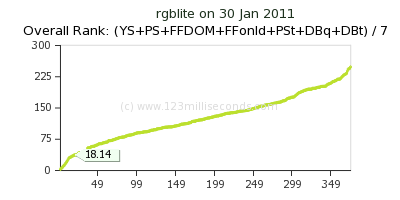
RGBlite theme is among the top 10 most fastest WordPress themes in one measurement. Here is the overall rank image from the result:
How to install
Download the theme from the link below. Then upload it to the /wp-content/themes/ directory and select it in WordPress console will make this theme work.
Build in support for plugins
It is recommended to install these plugins while using this theme and the page template:
WordPress Popular Posts
Sitemap Generator for WordPress
Please install these plugins when you using this theme. These plugins will make this theme function well as the blog it is originally designed to.
Preview, download and Licence
Free to download, free to use, free to customize.
Released under the GPL License (What is the GPL?)
Preview is available: on WordPress.org.
Download: RGBlite WP Theme.(Version 1.3, Feb. 3, 2012)
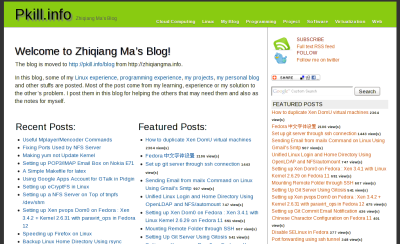
How to get the homepage like the demo screenshot
If you like the homepage style in the demo screenshot which is different from the default recent posts list, you can easily follow these steps:
1. Create a page for the homepage. The content of this page will disappear on the top side. Select “Homepage” for the template on the right side of the page editing page.
2. In “Settings->Reading” in WordPress’s control panel, select “A static page” in the “Front page displays” section. Select the page you have created in step 1 for the “front page”.
3. The “Featured posts” part in the homepage requires “WordPress Popular Posts” plugin. After install this plugin, the “Featured posts” will appear.
The top part of the right sidebar is actually a “Text widget” which can be designed by yourself.
Translation
Thanks to the people that translate this theme to other languages:
Romanian, Alexander Ovsov (Web Geek Sciense).
Change Logs
Feb. 3, 2012. Update to version 1.3.
Feb. 1, 2011. Add page load speed measurement result.
Version 1.1.3. Fix lots bugs; delete archive.php, missing.php; use add_theme_support(‘automatic-feed-links’); smaller footer font;
Jul. 22, 2010 Add “How to get the homepage like the demo screenshot” part.
Version 1.1.2. Prettied default sidebar; Search form always stays on top of the sidebar; Search functions run now.
Version 1.1.1 Add nav menu support; Add body_class(); add wp_link_page(); Add default sidebar; Add search form in default sidebar;
Version 1.1.0 Change post meta in post to two lines and add the right part of first line; Add text before content; Move post meta from file to function; No border between content and sidebar; Homepage has page number; no border-bottom for header; post font 12px; h2 28px; h3 22px; h4 16px; Change title format. Head logo and the menu is on two lines; Change tag cloud line-height to 2em;
May 31, 2010. Change index.php.
May 29, 2010. The first version 1.0.0 released.

兄台,想请教一下,如何才能把这个主题设置的如同你的DEMO图片一样?
如能解释一二,不胜感谢!!
@jackfans
Hi,
这个Demo图片是这样得到的:
主页设置为使用一个Page页面. 先增加一个page, 在右边模板的地方选择Homepage. 自己写的内容会出现在最上面. “Recent posts”自动产生.
Featured posts 部分是使用”WordPress Popular Posts”插件得到的. 安装这个插件后这部分就会出现了.
右侧边栏上方的部分是一个text框, 内容是自己加的.
twitter和feed可以使用一个自己喜欢的图标.
分享是使用的 addthis.com 的.
搜索框是使用的google custom search.
Thanks a lot !!!
感谢Eric!
By the way , I also use “ercik” for my niche name for years !
Check it out and you will fall in love with it.
使用到你的主题,来留言一下。
hello
i am using this theme on my web. http://howtomaketheinternetfaster.com
i want to ask to you.
how step i doing to change my title using platinum seo pack.
i can’t edit my title. the title live from general setting on wp. i need to change it.
please answer to my email in assaud22@gmail.com
thanks
best regard
ahmad
Hi,
If you want to change the
<title>
<?php
if (is_category()) {
    _e('Topic: ');
} else if (is_tag()) {
    _e('Tag: ');
} else if (is_home()) {
    bloginfo('description');
}

$pageNumber = get_query_var('paged');
$pageNumber = $pageNumber ? $pageNumber : 1;

if ($pageNumber && $pageNumber > 1) {
    wp_title('', true, 'right');
    _e(' - ');
    _e("$pageNumber");
    _e(' | ');
} else {
    wp_title('|', true, 'right');
}
bloginfo('name');
?>
</title>
and you can change it to whatever you like.
If you just want to make the other plugins change the title, you may try to change these code to:
<title> <?php wp_title('', true, 'right'); ?> </title>I had been searching for creative concepts for my own web site and
noticed ur blog post, “RGBlite WordPress Theme – Web Tutorials – Fclose.
com”, do you care in the event that I personally start using
a handful of of ur tips? Thx -Katia